
Group About Page
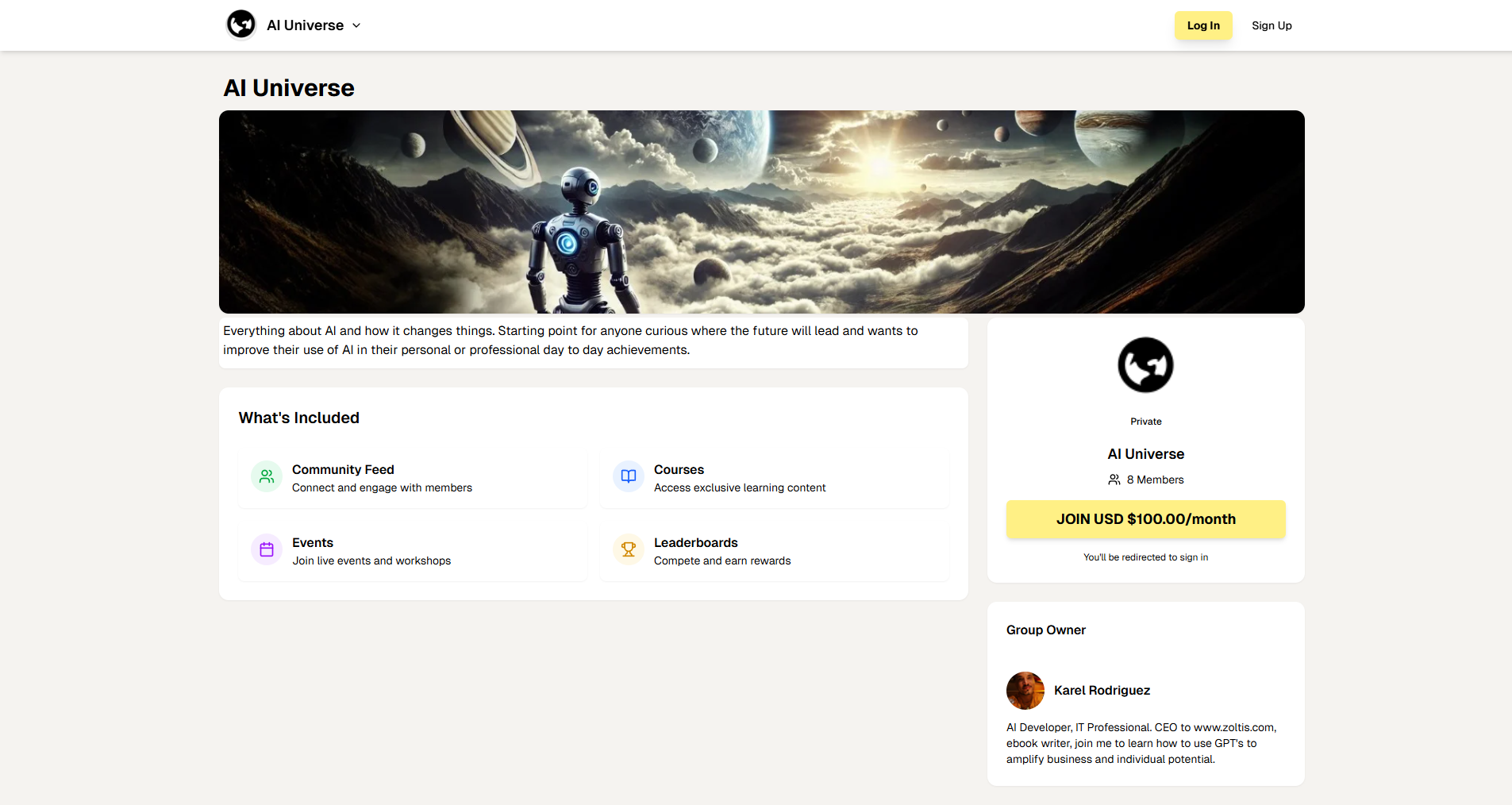
The About page is your first detailed look at a community. It provides comprehensive information to help you decide whether to join. You can view this page whether you're already a member or just exploring.
Understanding the About Page
Purpose:
-
Learn what the community is about
-
See what features and content are available
-
Understand pricing and membership requirements
-
Meet the community owner
-
Make an informed decision about joining
Page Layout
Top Header Section:
-
Group Logo & Name:
-
Displays the community's branding prominently
-
Helps you identify the community
-
Usually matches the community card you clicked
-
-
Navigation Tabs:
-
Community: Feed and discussions (requires membership)
-
Classroom: Courses and learning (requires membership)
-
Calendar: Events and scheduling (requires membership)
-
Members: Member directory (requires membership)
-
Leaderboards: Rankings and points (requires membership)
-
About: Community information (public, anyone can view)
-
Note: Most tabs require membership, but About is always visible
-
-
Search Bar:
-
Global search across the platform
-
Useful for finding other content while browsing
-
-
User Actions (Top Right):
-
Notifications Icon: View your notifications
-
Messages Icon: Access direct messages
-
Profile Icon: Your profile menu
-
Main Content Area (Left Side):
-
Group Banner Image:
-
Large, prominent header image
-
Visual representation of the community's theme
-
Usually customized by the community owner
-
Tip: The banner gives you a sense of the community's style and focus
-
-
Group Description:
-
Detailed, multi-paragraph description
-
Explains:
-
What the community is about
-
Who it's for
-
What you'll learn or gain
-
The community's mission and values
-
-
Read Carefully: This is your best source of information about the community
-
Example: "AI Universe is a community for AI enthusiasts of all levels. We explore AI agents, automation tools, and cutting-edge AI technology. Whether you're a beginner or expert, you'll find valuable content and connections here."
-
-
What's Included Section:
-
Bullet-point list of key features and benefits
-
Typically includes:
-
Community Feed: "Connect and engage with members through posts and discussions"
-
Courses: "Access exclusive learning content and structured courses"
-
Events: "Join live events, workshops, and webinars"
-
Leaderboards: "Compete and earn rewards through gamification"
-
-
Why It Matters: Shows you exactly what you get as a member
-
Tip: Compare this with other communities to see which offers the most value
-
Sidebar (Right Side):
-
Group Info Card:
-
Group Logo: Circular or square logo of the community
-
Privacy Badge:
-
Shows "Private" if it's a paid/
private community -
No badge means it's public/
free
-
-
Group Name: Official name of the community
-
Member Count:
-
Shows current number of members
-
Example: "8 members" or "1,234 members"
-
Tip: Larger communities may have more activity
-
-
Pricing Information:
-
"Free": No cost to join
-
"USD $XX.XX/
month": Monthly subscription price -
Important: Understand the cost before joining paid communities
-
-
Join Button:
-
Large yellow button to join the community
-
If Not Logged In: Shows "You'll be redirected to sign in"
-
If Logged In: Clicking joins you (free) or takes you to payment (paid)
-
After Joining: Button may change to "View Community" or similar
-
-
-
Group Owner Card:
-
Owner's Profile Picture: Circular avatar of the community creator
-
Owner's Name: Full name of the person who created the community
-
Owner's Bio/
Description: -
Brief description of the owner
-
Their expertise or background
-
Why they created the community
-
-
Why It Matters: Understanding the owner helps you understand the community's direction and quality
-